Keep every load
in view.
Organize load revenue, routes, miles, status, trucks and drivers without piecing together separate spreadsheets.
 ClearFleetIQ
Your truck works hard. Know what it actually earns. Bring loads, operating costs and settlements into one clear view.
14 days to explore. No credit card required.
Less spreadsheet hopping.
More clarity, mile after mile.
01 / ONE CONNECTED WORKSPACE
Track the work. Capture the costs. Understand the result. Built around the numbers trucking businesses need to see.
Organize load revenue, routes, miles, status, trucks and drivers without piecing together separate spreadsheets.
Bring fuel, DEF, driver pay, tolls, hotels, maintenance and fixed expenses into the same operating picture.
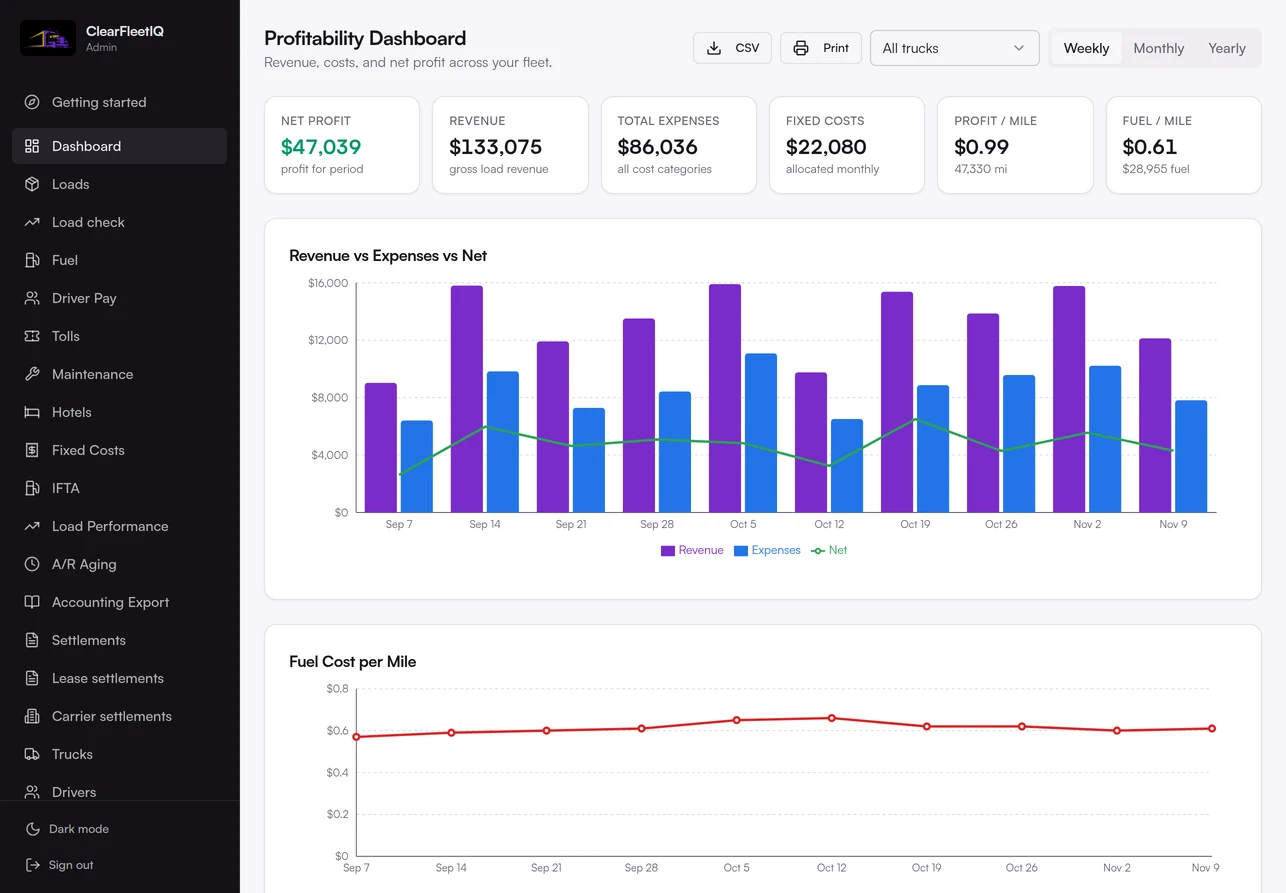
Review profitability, compare performance, prepare settlements and export accounting data when your enabled modules support it.
Take a phone photo of a fuel, hotel, maintenance or toll receipt and ClearFleetIQ fills in the form for you to check and save. The photo is read on your device; it is not uploaded or stored.
Import an E-ZPass, Bestpass, PrePass or other toll statement saved as CSV. Tolls are matched to trucks by unit, VIN or tag number, and payments and tolls you already entered are flagged before anything is saved.
See which trucks cost the most to fuel this month, last month or year to date, next to a fleet total, and export the report as CSV.
02 / THINK BEYOND THE RATE
The load payment is only the starting point. Change the numbers and see how operating assumptions affect what’s left.
Illustrative calculator, separate from your account. It estimates contribution after only the costs listed, not net business profit, taxes or a guaranteed outcome.
Put your real numbers to work03 / YOUR OPERATION, YOUR VIEW
Keep the detail you need without losing sight of the business. Explore the workflows for your operation.
Know your costs.
Know your take-home picture.
Connect your loads with fuel and operating expenses. Review the profitability view, then work through lease-on settlements when the module is enabled.
See the operation.
Not just the totals.
Bring trucks, drivers and loads into a shared workspace. Use enabled analytics and settlement modules to review the detail behind fleet performance.
Features depend on the plan and modules enabled in your workspace. Fuel receipt scan is included with Fuel & DEF on every plan; hotel, maintenance and toll receipt scan and toll CSV import come with Operating Expenses, and fuel cost per mile by truck with Profitability Analytics (Fleet and above by default). Review availability in Plan and modules or on Pricing.
04 / START WITH YOUR NUMBERS
Set up your company, add your trucks and bring in your first load. Explore ClearFleetIQ with a 14-day trial.
The evaluation does not start a paid renewal. Paid monthly subscriptions are available separately through PayPal and require your approval. Current customer access follows assigned roles and modules; accounts do not automatically become read-only at the evaluation date.
Already have an account? Sign in ↗BEFORE YOU GET ROLLING
Loads, revenue, miles, trucks, drivers and operating expenses. Depending on enabled modules, you can also use fuel and DEF tracking, profitability analytics, settlements and accounting exports.
Yes. Scan receipt reads a phone photo of a fuel, hotel, maintenance or toll receipt and fills in the form; you check the details before saving. The photo is processed in your browser and is not uploaded or kept. Import CSV on the Tolls page loads a whole toll statement, matches each toll to a truck and skips account payments, totals and tolls you already entered. Fuel receipt scan is part of Fuel & DEF; the expense receipt scan and toll import are part of Operating Expenses.
No. Create a company workspace with a company name, username and password. The trial lasts 14 days, and signup does not create an automatic paid renewal. To subscribe, sign in, choose a plan and approve the recurring payment separately in PayPal.
Monthly subscriptions are available at USD $19.95 for Owner-Operator, $49.95 for Fleet, $69.95 for Lease-On and $99.95 for Enterprise, including for Canadian business customers. Compare prices and included modules. Sign in to choose a plan and review the PayPal total before approving a real recurring payment. Initial-payment refunds can be requested within seven days; renewal refunds are reviewed individually. Read the refund policy.
ClearFleetIQ supports administrator, dispatcher, accountant and driver roles. A company administrator can manage users and their permissions. Module access also depends on your company’s plan.
It is an operating and profitability workspace, not a substitute for bookkeeping or tax advice. The accounting export module helps you move data into your accounting workflow; it is not a live accounting-system sync.
Use Sign in at the top of this page. Your existing credentials remain unchanged. If a username exists at more than one company, enter the company ID supplied when the workspace was created.
CLEAR NUMBERS. INFORMED DECISIONS.
Keep the wheels turning.
Keep the business in focus.